
SEE EVERY PLAYER’S MINUTES
A soccer playing-time tracker for every rotation.
Use the minutes on the screen to guide your next substitution, then keep a record of the game.
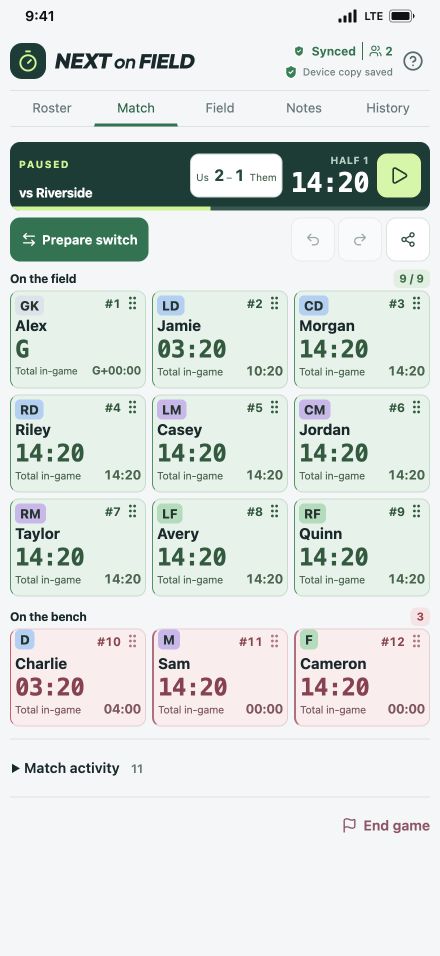
Remembering every player’s time on the field gets harder as substitutions, position changes and coaching decisions overlap. Next on Field records playing time from the game clock and the lineup changes you enter, so you can check the numbers instead of relying on memory.
Track the game as it happens
Start with the players who are on the field. Run the game clock while play is being timed, and record each substitution when it happens. The app tracks playing time, time on the bench and time spent at each position.
Keep the clock and lineup accurate throughout the game. Preparing a substitution leaves players in their current positions until you execute it. That helps you plan ahead while keeping the record tied to the change on the field.
Use a minutes target as a planning aid
When your team’s approach is to share minutes evenly, a rough target can help. For example, seven field places over a 40-minute game give you 280 player-minutes. Shared among ten available players, that is an average of 28 minutes each.
That example assumes every player shares all seven places. A fixed goalkeeper, late arrival, injury or different match length changes the calculation. Follow your team’s playing-time expectations and competition rules, and use the recorded minutes to decide who needs the next turn.
Finish with a saved game summary
Finish and save the game to keep its summary in History. Review the final score, each player’s playing time, time at each position and any game or player notes you recorded. Export the summary as a CSV when you want a separate copy or a file to share.
A saved summary can help you reflect on a rotation after the sideline rush has passed. Compare the actual minutes with your intentions and use that information when planning your next game.
Keep working when the signal drops
Teams already saved on your device work offline. Your assistant can share the same team using their own account, with live updates when both coaches have internet. Offline changes can sync when the connection returns.
Read how the soccer substitution app helps you prepare changes, or visit support for help with saved teams and coach invitations.
Give your next rotation a clearer picture
Next on Field is in private testing for iPhone, iPad and Android. Public store links will appear on the homepage when the app is available.
Explore the app